



Fontke.com>Article>Details
Word中快速设置字体的技巧
Introduction在Word中设置字体通常是到字体下拉框中选择,如果你每次选择的都是那几种常用的字体,如黑体、宋体、仿宋体的话,不如将它们直接请到工具栏上,这样就方便多了。在Word菜单中依次选择“工具/自定义”,在打开的窗口中点击“命令”标签卡,接着在
在Word中设置字体通常是到字体下拉框中选择,如果你每次选择的都是那几种常用的字体,如黑体、宋体、仿宋体的话,不如将它们直接请到工具栏上,这样就方便多了。
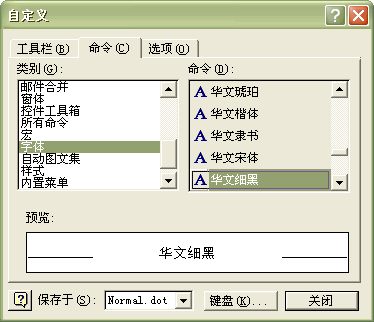
在Word菜单中依次选择“工具/自定义”,在打开的窗口中点击“命令”标签卡,接着在左侧“类别”栏中选择“字体”,右侧“命令”栏中即会出现所有的字体,我们只要直接用鼠标将需要的字体拖放到工具栏上即可(如图)。快去试试吧。
Relevant font family

Relevant font foundry

Word中快速设置字体的技巧 Comments
Word中快速设置字体的技巧 Latest comments
No relevant comments
-
 ShanhaiFonts
Brand:山海字库
Area:China

-
 Cangji Fonts
Brand: 仓迹字库
Area: China
-
 JT Foundry
Brand: 翰字铸造
Area: Taiwan, China

-
 Handmadefont
Brand:
Area: Estonia

-
·千图字体
-
 HyFont Studio
Brand: 新美字库
Area: China









Recommended font article
- ·Moving Hands (Helena Hauff Remix) by The Klinik, official video
- ·"Fantastic!" ad for Captain Fantastic & the Brown Dirt Cowboy by Elton John & Bernie Taupin
- ·Iconic Transport for London logo undergoes subtle redesign
- ·The Future of Sex poster
- ·Sinnesreize / Embracing Sensation by Silvia Gertsch and Xerxes Ach
- ·Surabaya Beat by Beat Presser, Afterhours Books
- ·Brother Moto Flat-Trackin' Tee
- ·"Die Alpen – Vielfalt in Europa" stamp
- ·Antropofagia. Palimpsesto Selvagem
- ·"David Bowie is turning us all into voyeurs" button