



Fontke.com>Article>Details
将字体嵌入PowerPoint文件随身携带
Introduction我们经常会遇到这样的情况:由于每台计算机中安装的字体文件不同,在一台计算机上制作好的PowerPoint课件在另一台计算机上打开时,设定的字体会发生改变,影响课件的播放效果。我们经常会遇到这样的情况:由于每台计算机中安装的字体文件不同,在一台计算机上制作好的
我们经常会遇到这样的情况:由于每台计算机中安装的字体文件不同,在一台计算机上制作好的PowerPoint课件在另一台计算机上打开时,设定的字体会发生改变,影响课件的播放效果。
我们经常会遇到这样的情况:由于每台计算机中安装的字体文件不同,在一台计算机上制作好的PowerPoint课件在另一台计算机上打开时,设定的字体会发生改变,影响课件的播放效果。
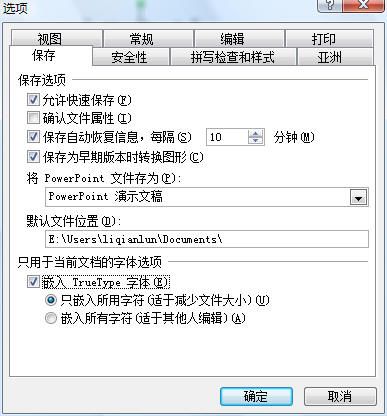
其实,只要在保存PowerPoint文件时选择“嵌入TrueType字体”,就可以让PowerPoint将字体“随身带”了。设置方法如下。
打开一个PowerPoint文件,单击菜单栏中的〔工具〕按钮,在下拉菜单中选择“选项”命令,系统会打开“选项”对话框,切换到“保存”标签,选中其中的“嵌入TrueType字体”选项。为了减少演示文稿的容量,在选中“嵌入TrueType字体”选项后,再选定下面的“内嵌入所用字符”选项。单击〔确定〕关闭“选项”对话框。
Relevant font family
Relevant font foundry

将字体嵌入PowerPoint文件随身携带 Comments
将字体嵌入PowerPoint文件随身携带 Latest comments
No relevant comments
-
 ShanhaiFonts
Brand:山海字库
Area:China

-
 Cangji Fonts
Brand: 仓迹字库
Area: China
-
 JT Foundry
Brand: 翰字铸造
Area: Taiwan, China

-
 Handmadefont
Brand:
Area: Estonia

-
·千图字体
-
 HyFont Studio
Brand: 新美字库
Area: China









Recommended font article
- ·Benetton identity redesign
- ·Alphabet Stories by Hermann Zapf
- ·The Future of Sex poster
- ·"David Bowie is turning us all into voyeurs" button
- ·Barbe à papa Cotton Candy
- ·Brother Moto Flat-Trackin' Tee
- ·"Jesus Music" ad for Myrrh Records
- ·Jim Nutt: Coming Into Character at Museum of Contemporary Art Chicago
- ·Fonts Design of Childhood Memory
- ·New York New York, Jazz St. Louis